


Know Weather: Live Radar
4.5465.00 Reviews
App Specs
- Version
- 1.3.5
- Updated On
- License
- Free
- Downloads
- 5,000,000+
- Developer
- ReadMore
- Categories
- Weather
- Platform
- Android
Screenshots
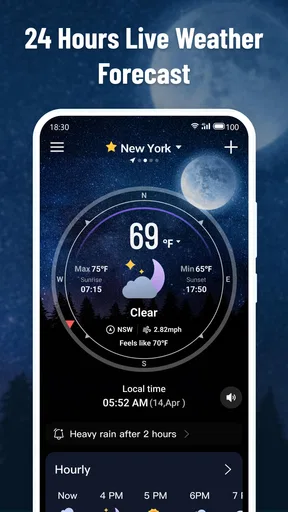
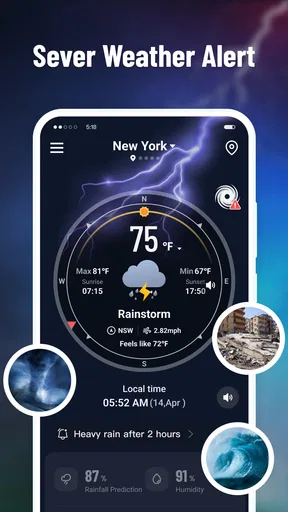
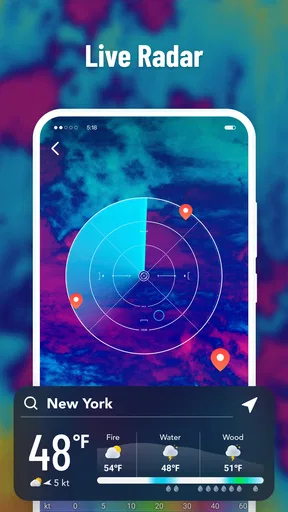
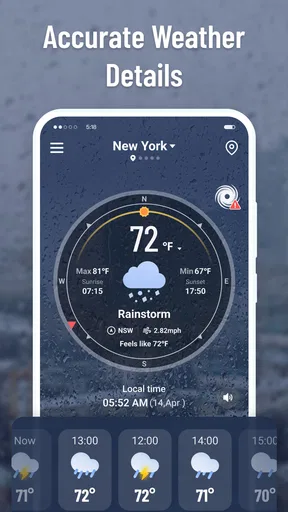
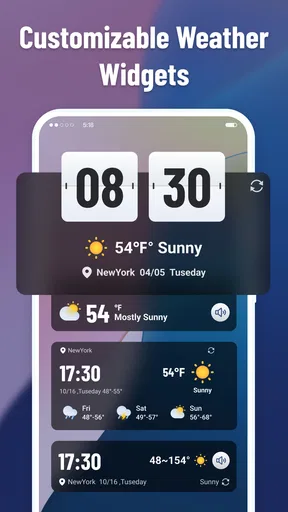
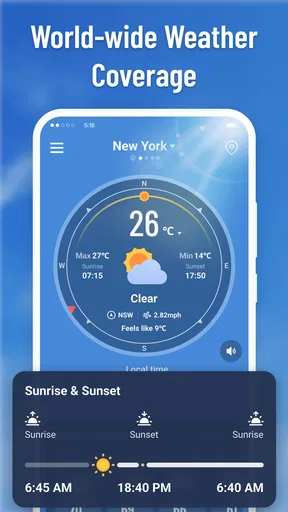
 Analysis by AppCompare
I spent time with Know Weather: Live Radar as a straightforward weather app, and my first impression was that it aims for clarity rather than trying to become an all-purpose travel or lifestyle platform. That matters because weather apps often become crowded with panels, alerts, maps, and promotional extras. Here, the appeal is simpler: open it when you want to understand the conditions around you and make a sensible decision about the next few hours.
The app comes from ReadMore and is available free of charge for Android users. It sits in the weather category, carries an Everyone age rating, and has reached more than five million installs. Those figures suggest that it has found an audience beyond people who enjoy experimenting with forecast tools. In my view, its best match is someone who wants a readable daily weather check, with radar-oriented information available when a broader view of changing conditions is useful.
That does not mean every first launch will feel effortless. Weather apps depend heavily on the relationship between the application, the phone’s location services, the network connection, and the quality of the weather information available for a particular place. When something looks wrong, it is easy to blame the app immediately. A better review of this one has to separate genuine app friction from problems caused by setup or by the surrounding phone environment.
Getting past the first points of friction
I find the most useful way to approach a weather app is to make the first check a deliberate one: confirm the place you care about, then decide what question you need answered. That keeps a confusing result from turning into a frustrating routine and helps distinguish navigation problems from uncertainty in the forecast. From there, I’d look at the small habits that can make repeated checks easier to manage.
Why the first weather check can feel less useful than expected
The most common stumbling block with a weather app is not reading the forecast; it is getting the correct place on screen. If the app cannot identify your location, or if you decline a location request and do not choose a place another way, the opening experience can feel incomplete. I recommend treating the first launch as a short setup task instead of judging the app from an empty or mismatched view.
Start by checking whether your phone’s general location service is enabled. An app can only work with the location information the operating system makes available to it. If the system setting is off, allowing access inside the app will not solve the underlying issue. When location is enabled, confirm that the app is allowed to use it while you are using the application. This is a sensible balance for a weather tool: you can check conditions without automatically giving it more access than you are comfortable with.
If you prefer not to use location services, that does not automatically make the app unsuitable. A manually selected place can be more practical for people who mainly check a workplace, a child’s school, a holiday home, or a relative’s town. It also avoids a small but annoying problem that can happen when you move between nearby areas and the phone keeps choosing the wrong one for your purpose. The important point is to make the selected place intentional rather than assuming the first result is always the one you need.
Worth Reading Before You Choose

EA SPORTS FC Mobile 26 Is a Bigger Football Game, but It Takes Time

Flipboard Shows What News Apps Must Do Beyond the Feed

Switching to Android Auto Means Rethinking Your Driving Routine

Google Calendar Makes a Crowded Week Easier to Manage

Ludo King Makes the Most of the Minutes Between Plans

Baby Panda World Brings Quick Play to Modern Phones, but Its Game Library Feels Busy
Another early source of confusion is stale information. Weather data is delivered through the network, so a poor connection, restricted background data, or a temporary service interruption can make the screen appear not to update. I would first switch between a reliable Wi-Fi connection and mobile data, then reopen the app. If the displayed conditions are still unchanged, pull off the app completely and launch it again before changing any deeper phone settings.
Small setup checks that prevent bigger misunderstandings
I found it useful to decide what I actually want from the app before changing settings. If my goal is a quick morning decision, I care about the current condition and the near-term outlook. If I am trying to judge whether a bike ride or outdoor job can continue, I need to inspect the radar view and think about movement over time rather than treating one icon as a guarantee. This distinction prevents the app from being blamed for a question that requires a different kind of reading.
Keep the phone’s date, time, and time zone correct. Forecasts are time-sensitive, and a device with an incorrect clock can make perfectly reasonable information look out of place. This is a general phone check, but it is especially important when travelling or when the device has recently changed networks. It is also worth checking that battery-saving settings are not aggressively closing the app while you are using it. A weather screen that reloads slowly after every switch is often suffering from system restrictions rather than a problem with the forecast display itself.
Do not assume that a radar picture is a promise of exact rain at your front door. Radar is most useful as a moving picture of precipitation patterns, and its value depends on how quickly the weather is changing, how far away the activity is, and how accurately the displayed area represents your location. I use it to improve a decision, not to turn an uncertain forecast into a precise appointment.
For a cleaner experience, I would choose one or two places that matter most and avoid constantly changing the location while trying to compare everything at once. A focused routine makes the app easier to interpret. Check home in the morning, inspect the destination before leaving, and use the radar only when the timing or direction of weather matters. That workflow is more dependable than repeatedly refreshing without a clear question in mind.
Recovering when the screen, place, or forecast seems wrong
When the wrong town appears, I would not immediately reinstall the application. First, verify the spelling of the selected location and check whether there are several places with similar names. A nearby suburb, district, or town can have a different forecast presentation even when the distance seems small. Selecting the exact place once is usually more useful than repeatedly refreshing a vague search result.
If the app seems frozen, close it and open it again, then test the connection in another application. This simple comparison tells you whether the problem is local to the weather app or part of a wider network issue. If other apps also struggle, restarting the connection or moving to a stronger signal is the sensible next step. If only this app is affected, clearing its temporary cache through the phone’s app settings can be worth trying, provided you understand that system menus vary by device.
I would be more cautious about clearing all storage. That can remove local choices and force you through setup again, so it is a later troubleshooting step rather than a first response. Reinstalling can also be unnecessary if the issue is caused by a temporary service problem or an incorrect system setting. A restart, a location check, and a connection test usually tell you more with less disruption.
The current version is 1.3.2, and the app supports Android 7.0 or later. That broad compatibility is helpful for people using older phones, but older hardware can still behave differently from newer devices. If the interface feels slow, close other demanding apps, restart the phone, and make sure there is enough free storage for normal system operation. These steps will not improve the weather itself, but they can remove the sluggishness that makes a simple forecast tool feel unreliable.
There is a useful recovery habit for bad-weather decisions: compare the current view with the radar movement instead of relying on a single refresh. If the map suggests a band of rain is moving toward your area, wait briefly and check again before deciding whether to leave. If the display remains unchanged while the network is clearly working, record what you saw and use another trusted source for a time-sensitive safety decision. The app can support judgement, but it should not be the only source for serious travel or emergency choices.
Separating app problems from weather-data limitations
Sometimes the app is working exactly as designed while the real-world result still feels inaccurate. Weather changes locally, and a condition in one street can differ from a nearby open area, hill, coast, or built-up neighbourhood. A forecast that says rain is possible does not mean every person in the wider area will see it at the same minute. I think this is one of the most important expectations to set before using any radar-based weather application.
Radar interpretation also has a learning curve. Colours and movement can look dramatic, but the practical question is always the same: is precipitation moving toward the place and time that concern me? A large patch on the edge of the map may be irrelevant to a short walk, while a smaller band directly across a commute route may matter a lot. I get more value by looking at direction and timing than by treating the strongest colour as an automatic reason to cancel plans.
Location accuracy can be affected by the phone itself. Indoors, underground, between tall buildings, or in areas with weak positioning signals, the device may estimate a place rather than identify it precisely. If the forecast seems to be for the wrong side of town, compare the selected location manually. This is also why I prefer a fixed place when I am planning an activity: it removes uncertainty caused by a moving phone.
Network conditions create another misleading symptom. A forecast may load partly, leaving the impression that the app has failed, when the connection has simply interrupted during the update. Try a stable connection and give the screen time to complete before drawing conclusions. If you are preparing for a journey, check the forecast while connected rather than waiting until you are already in a weak-signal area.
For high-stakes situations, I would use this app as one input rather than as an official warning channel. A weather app is convenient for everyday planning, but severe conditions, aviation, outdoor work, and long-distance travel deserve information from the relevant official services as well. That is not a criticism unique to this product; it is a sensible boundary for consumer weather software in general.
How I fit it into an ordinary day
My most useful routine was deliberately short. In the morning, I checked the current conditions for deciding what to wear and whether to carry rain protection. Before leaving, I looked again at the destination rather than assuming home and destination would match. When the sky was changing quickly, I opened the radar view and watched the direction of the precipitation instead of making a decision from one static symbol.
That workflow is particularly useful for a parent walking children to school, a commuter deciding whether to cycle, or someone arranging a short outdoor job. The practical advantage is not that the app removes uncertainty; it helps turn a vague question into a visual one. “Will it rain sometime today?” is less useful than “Is the rain area moving across my route during the next part of the journey?”
There is also a good use case for people who dislike complicated weather dashboards. The app’s store rating is 4.5 from roughly seventeen thousand ratings, and I can understand why a simple weather experience would appeal to a broad audience. It is free, rated for Everyone, and does not require a user to be a weather enthusiast before opening it. The strongest benefit is the low barrier to checking conditions without committing to a more elaborate forecasting service.
At the same time, I would not choose it automatically for someone who needs deep historical charts, specialist meteorological detail, or a highly configurable planning system. People who want to compare many forecast models, build detailed travel itineraries, or receive specialised professional information may be better served by a dedicated alternative. A general weather app can be excellent for everyday decisions and still be the wrong tool for technical forecasting.
Where it fits beside familiar weather alternatives
Compared with a basic phone weather widget, Know Weather: Live Radar is more useful when I want to inspect changing precipitation rather than glance at a single temperature or icon. A widget wins for speed because it is already visible, but it usually encourages a very brief check. This app makes more sense when the question involves movement, timing, or a second location.
Compared with a large weather service packed with alerts, maps, lifestyle indexes, and custom panels, this app feels easier to approach. The trade-off is depth. A bigger service may offer more tools for users who enjoy comparing details, while ReadMore’s app is better suited to keeping the decision in front of me: what is happening, where it is happening, and whether it affects my next plan.
Compared with searching the web for the weather, the app offers a more repeatable routine. I do not have to reformulate the same question each time, and a radar-oriented check is more natural when I want to see a pattern rather than read a paragraph. The web remains useful when I need official warnings or information for a remote destination, so I see the two approaches as complementary rather than competing.
The main trade-off is that a simpler app leaves more responsibility with the user. I need to select the right place, understand that radar is not a guarantee, and recognise when a network or phone setting is interfering. That is acceptable to me because these are small habits, but someone who expects completely automatic, location-perfect answers may find the experience less smooth than a heavily integrated weather service.
Who should use it and who should look elsewhere
I would recommend it to someone who wants a free Android weather app for regular checks, especially if radar is more useful to them than a long list of extra measurements. It is a good fit for commuters, casual walkers, families, and anyone who wants to decide whether to delay a short outdoor plan. The Android 7.0 minimum also makes it relevant to people who are not using the newest phone.
I would suggest looking elsewhere if your decisions depend on specialist warnings, professional-grade forecasting, extensive historical data, or unusually detailed customisation. I would also hesitate to recommend it as the sole source for severe-weather preparation. Its value is strongest in everyday awareness, not in replacing official guidance or a specialist service.
One final practical point is that the app is free, but “free” should not be confused with “effortless in every situation.” You still need a working connection, a sensible location choice, and a little radar literacy. Once those basics are in place, the experience becomes much more predictable. If the forecast appears odd, troubleshoot the phone and connection before deciding that the weather information itself is broken.
After using it, my opinion is positive but measured. Know Weather: Live Radar is at its best when it turns a quick weather question into a clear, practical check. It does not need to replace every other source, and I would not ask it to handle specialist forecasting. For everyday planning, though, the combination of a simple presentation and radar-focused thinking makes it a useful companion. ReadMore has produced an approachable weather app that rewards a focused routine: choose the right place, check the connection, read movement rather than promises, and use stronger official sources when the consequences really matter.
Pros
- Clear live radar maps help track approaching rain and storms.
- Weather alerts can provide useful warnings before severe conditions arrive.
- Location support makes it easy to monitor weather in multiple places.
- Forecast details are presented in a simple
- easy-to-read format.
- Useful for planning commutes
- outdoor activities
- and short trips.
Cons
- Some advanced radar or forecast features may require a subscription.
- Radar accuracy and update speed can vary by region.
- Frequent notifications may feel excessive for some users.
- The app may use noticeable battery and mobile data during live tracking.
- Advertising can make the free experience feel less streamlined.
FAQs for Know Weather: Live Radar
What is Know Weather: Live Radar and what does it offer?
Know Weather: Live Radar is a weather application designed to provide current conditions, forecasts, radar imagery, and weather alerts in one place. During testing, its main value was the combination of quick daily information with visual radar tools, making it useful for checking rain, storms, temperature changes, and upcoming conditions before commuting, traveling, or planning outdoor activities.
How accurate are the forecasts and live radar maps?
Forecast accuracy can vary depending on your location, local weather conditions, and the data sources used by the app. The radar is especially helpful for observing precipitation movement and nearby storm activity, but it should not be treated as an exact guarantee of what will happen at a specific address. For severe weather, users should also follow official local warnings.
Does Know Weather: Live Radar require location access?
The app can generally provide weather information for manually selected cities, but location permission may be requested to automatically display conditions for your current area. You can choose whether to grant access, and selecting a location manually is a useful option for users who prefer greater privacy or want to monitor several places, such as home, work, or a travel destination.
Can I receive severe weather alerts and notifications?
Know Weather: Live Radar may support notifications for changing conditions, precipitation, or severe weather, depending on the features available in your region and the permissions enabled on your device. Before relying on alerts, check the app’s notification settings and make sure battery-saving restrictions are not preventing background updates. Critical emergencies should always be confirmed through official authorities.
Is Know Weather: Live Radar free to download, and are there advertisements or premium features?
The application may be available to download without an upfront charge, but availability of advertisements, subscriptions, or premium tools can vary by platform and version. Some advanced features, such as expanded forecasts, additional radar options, or an ad-free experience, may require payment. Review the store listing and in-app purchase details before subscribing or confirming a purchase.


